Indice
Today, chat conversations are the driving force behind business relationships worldwide. Modern customers no longer just want a brand to be available; they demand immediate, clear, and helpful responses. The market has changed, and the way you communicate with customers is now the top priority. For this reason, implementing a WhatsApp chatbot is the fundamental requirement to multiply sales and organize customer service for any company that wants to grow.
However, some businesses confuse true automation with using the messages that come with the free WhatsApp Business app or by installing informal tools that put the account at risk. Real transformation happens when you use the Official API connected to Meta. This allows you to have platforms designed so that multiple agents can work at the same time, organize customers according to their needs, and use bots that help close more sales without losing the human touch.
This guide simply explains how WhatsApp chatbots work, what use cases exist depending on the type of business, and what the key steps are to activate a virtual assistant that turns daily chats into real revenue safely and easily.
How does a WhatsApp chatbot work at the business level?
For a WhatsApp chatbot to work smoothly, serve thousands of customers, and comply with security standards, it is essential to understand how a professional system is structured. When a business tries to automate its responses using informal or pirated tools, it breaks Meta's rules and risks having its business number permanently suspended. A secure and real corporate system is made up of three key components:
1. The Official WhatsApp Business API
It is the only option authorized by Meta. This technology connects the business number directly to WhatsApp, giving the company the necessary capacity to receive and send thousands of messages at the same time without the line going down. In addition, it enables attractive chat tools, such as interactive buttons, option menus, and product catalogs.
2. The automation engine
Within this engine, there are two types of assistants to choose from depending on the company's needs:
- Rule-based bots: They operate through simple, structured paths to solve quick tasks, such as providing business hours, branch addresses, order status, or transferring the conversation to an agent. They can also guide the customer step by step using buttons or menus as needed.
- AI-based automation: These are advanced assistants trained with company information (such as service manuals, price lists, or brand policies). They can understand what the customer writes freely, identify what they need, and provide a friendly, personalized response, without forcing them to press a series of buttons that ultimately do not meet the user's needs.
3. The management platform for work teams
Automation alone is not enough if agents have nowhere to see the traceability and management of the conversation. For this reason, for more effective operations, the bot needs to be connected to a tool where human agents find order, automation, and can perform well from a single platform. To achieve this, it is important to have a platform like Callbell with which the company can:
- Receive customers who have already been filtered and attended by the chatbot and were transferred to a human agent
- Organize all conversations in a single inbox.
- Classify customers with tags according to what they are looking for.
- Allow agents to intervene in the chat in real time when necessary.
- Adapt the most suitable option according to the company's activity: bots or AI agents.
How does a chatbot transform company departments?
Implementing this technology not only benefits customers, but completely revolutionizes operations across different company departments. Here’s how a WhatsApp chatbot transforms a business’s daily operations:
1. Sales department
- The problem: New chats come to WhatsApp thanks to ads. However, sales reps are busy on calls or closing deals, so it may take them 30 or 40 minutes to reply. By the time they respond, the customer has already messaged three other companies and is reviewing another business proposal.
- The solution with the bot: The bot greets the user instantly. It immediately welcomes them, shares the product catalog, and asks key questions (such as name, city, and which item they’re interested in). When the human agent takes over the chat from a multi-agent platform, they already have all the information at hand, making the sales process much faster.
2. Support and customer service department
- The problem: 70% of the messages the team receives are always the same questions: "What are your hours?", "Where are you located?", "How do I make a change?" This fills the inbox with repetitive messages and leaves no time for agents to solve complex problems or assist potential customers.
- The solution with the bot: It works with a smart options menu that automatically answers and resolves these frequent questions, without any human intervention. If the customer has a more complex case that the bot can’t solve, the system immediately transfers them to the human support team for personalized attention.
3. Operations and logistics department
- The problem: Customers write with questions like: "When will my order arrive?" or "Can you confirm if it’s been shipped?" To answer these, the team must manually look up the information in the internal system and reply one by one, missing opportunities to close sales processes.
- The solution with the bot: By connecting the bot to the customer or shipping management system, the chatbot asks the user for their ID number or tracking code. The bot automatically looks up the information and tells the customer the exact status of their order instantly, completely freeing the team from this task.
4. Healthcare sector
- The problem: Phone lines and chat are overwhelmed by patients looking to book, cancel, or reschedule appointments. Patient service staff lose valuable hours confirming appointments one by one and recording information in the system.
- Bot action: Upon greeting, the chatbot displays a menu with options like Book Appointment, Check Specialties, or Talk to Reception. The bot requests patient data and, connected to the clinic’s system, shows available times. It also automatically schedules reminders 24 hours before the appointment, allowing the patient to confirm or cancel with a single click. If canceled, the slot is immediately freed in the system.
5. Education sector (Schools, universities, institutes)
- The problem: During enrollment periods, the admissions area is overwhelmed by hundreds of requests about costs, study plans, invoices, and requirements. Day-to-day, students, applicants, or parents flood the channel with basic administrative questions.
- Bot action: The chatbot acts as an admissions advisor available 24/7. It filters and classifies prospects by sending digital programs, study plans, and answering questions about monthly fees. If the bot detects that the lead is highly interested through menu options, it collects their contact details and transfers the chat to the relevant advisor, keeping the entire history organized.
6. Fitness centers
- The problem: Agents spend the day offering, checking validity, and canceling memberships manually. They also send updated rates, reserve spots for classes with limited capacity, and follow up with users to pay their monthly fees.
- Bot action: The virtual assistant becomes the administrator of repetitive tasks. Users can check daily class schedules or book their spot directly from the chat by pressing a button. For collections, a multi-agent system allows scheduling mass notifications with templates reminding about plan expiration and includes a direct button with the payment link. If they have a question about their plan, the bot checks the database and tells them the exact date of their next payment in seconds.
How to create a WhatsApp chatbot with Callbell
Step by step to create a WhatsApp chatbot with Callbell
- You must first register at Callbell
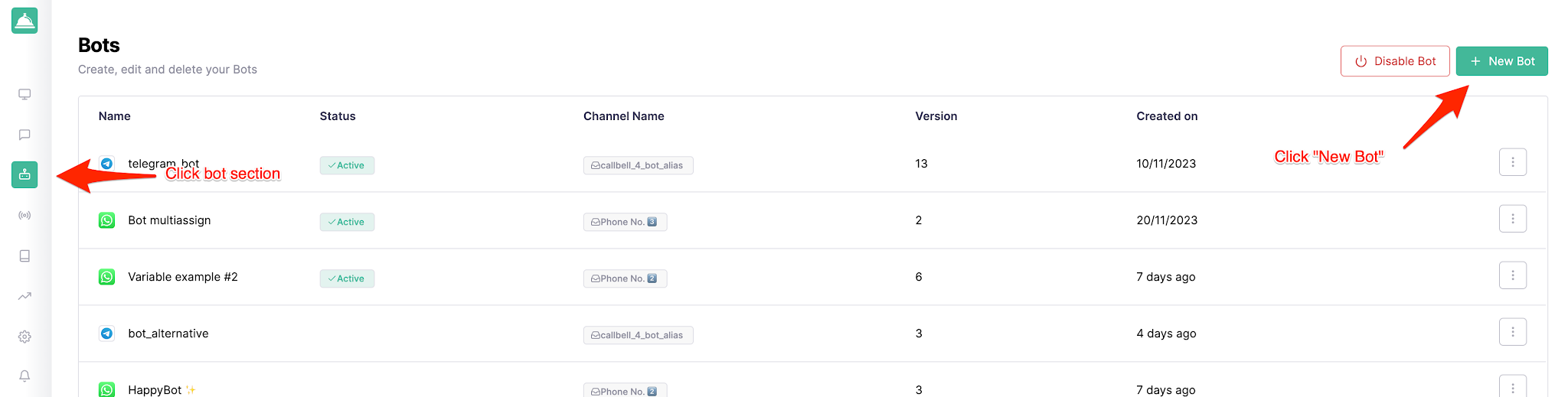
- Next, go to the Bot Builder section on the left sidebar and click the Create new bot button:
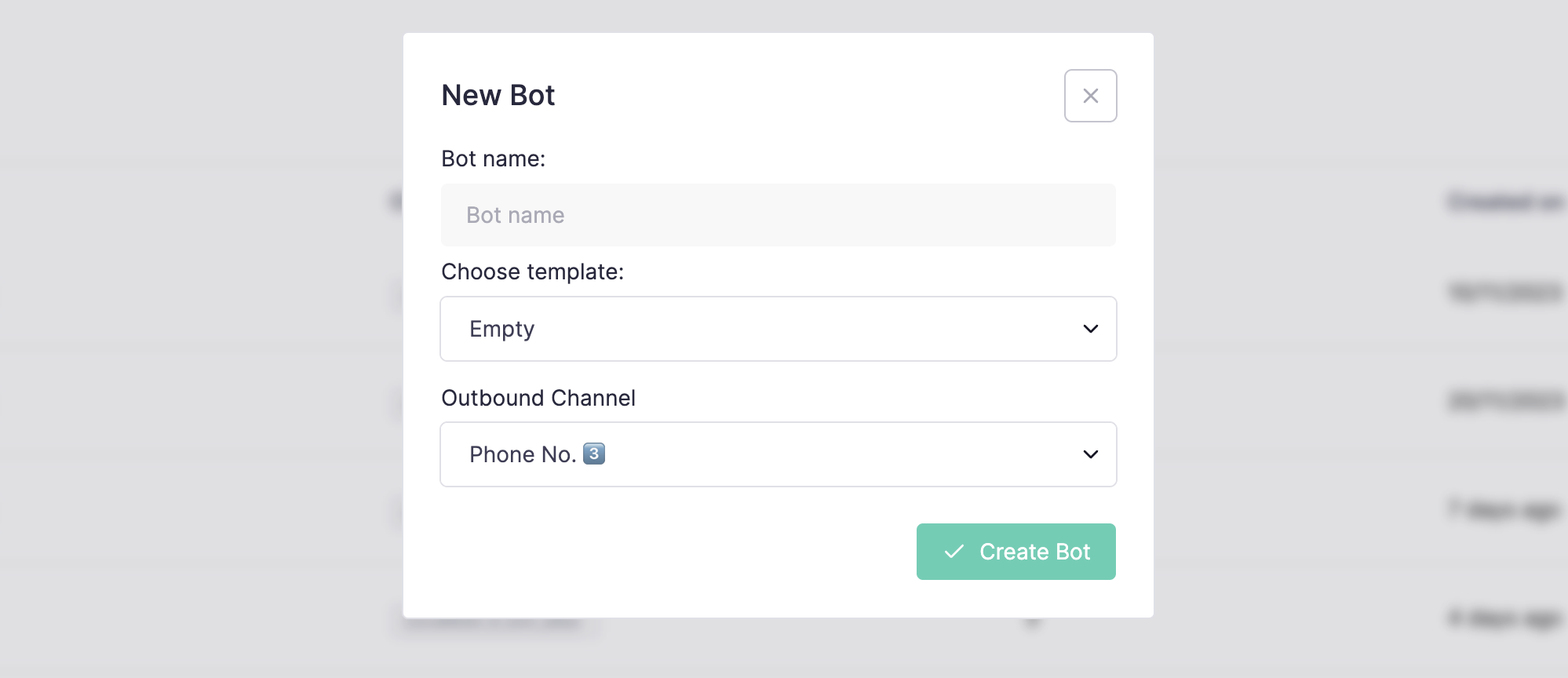
- A pop-up window will appear asking you to choose a name for the bot and the channel you will use
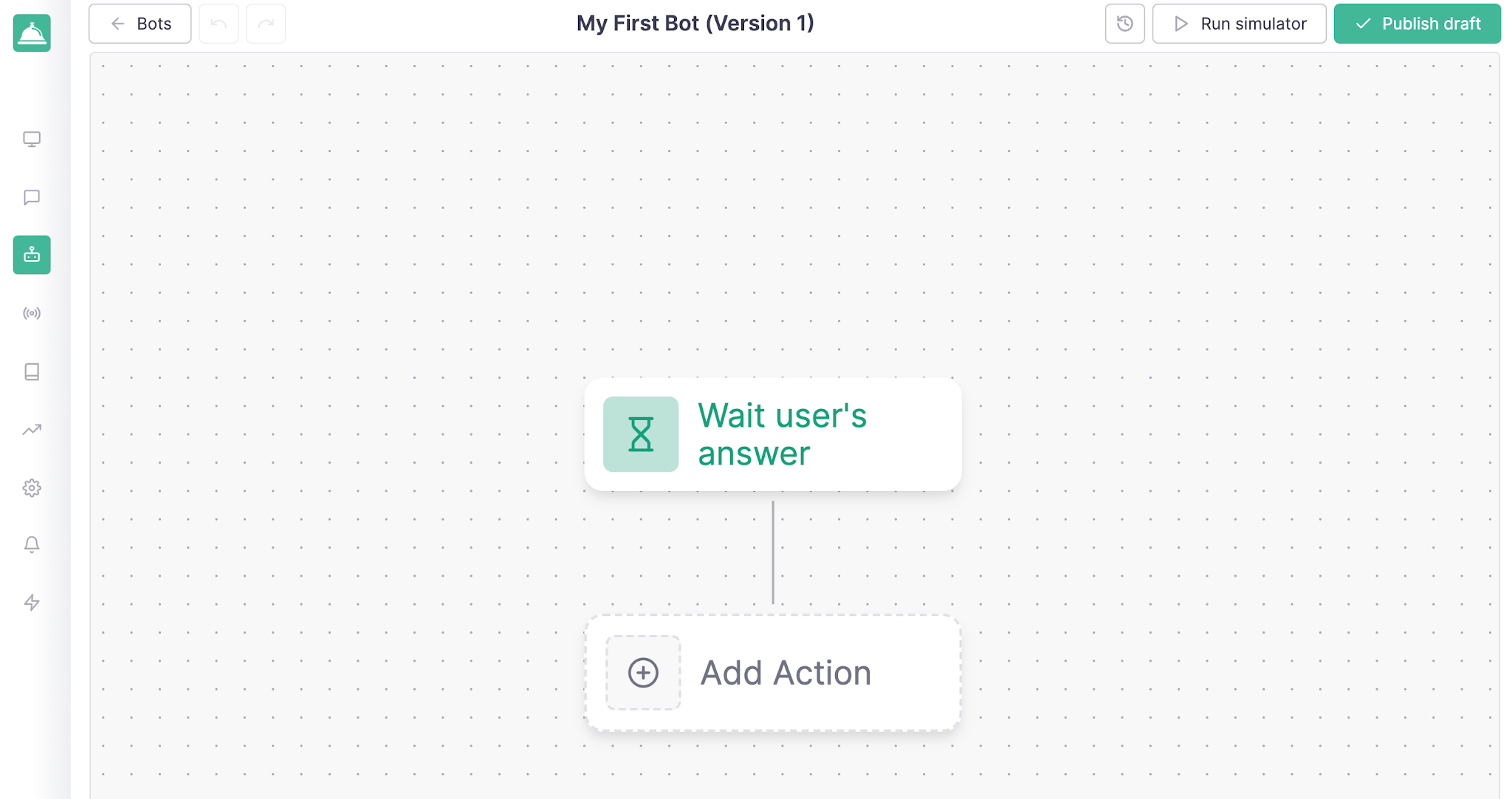
- After clicking the Create bot button, you’ll be redirected to the bot builder page to start designing your first chatbot:
For the bot to work, it’s important to add an action. For example: Reply to the user with a message when they send a message to the bot:
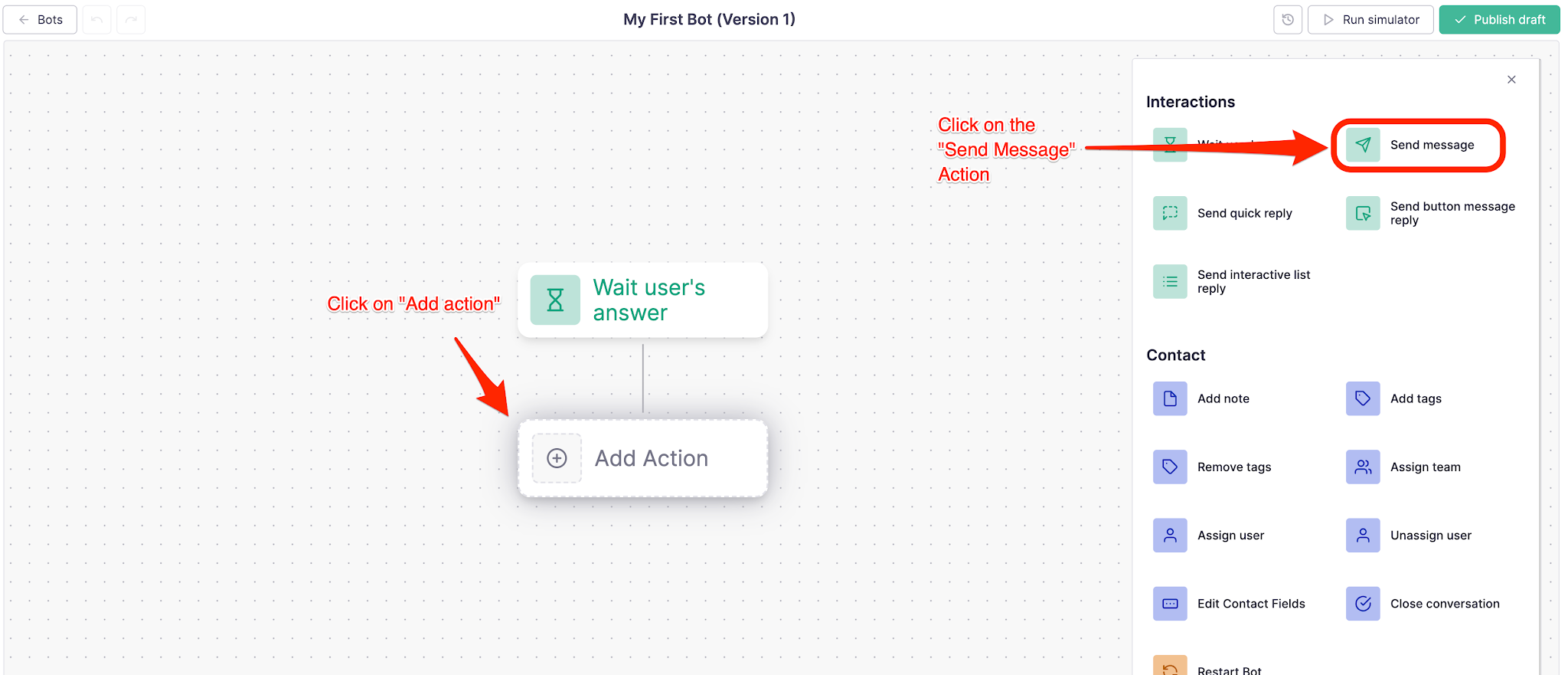
- Click the Add new action button and choose the Send message action
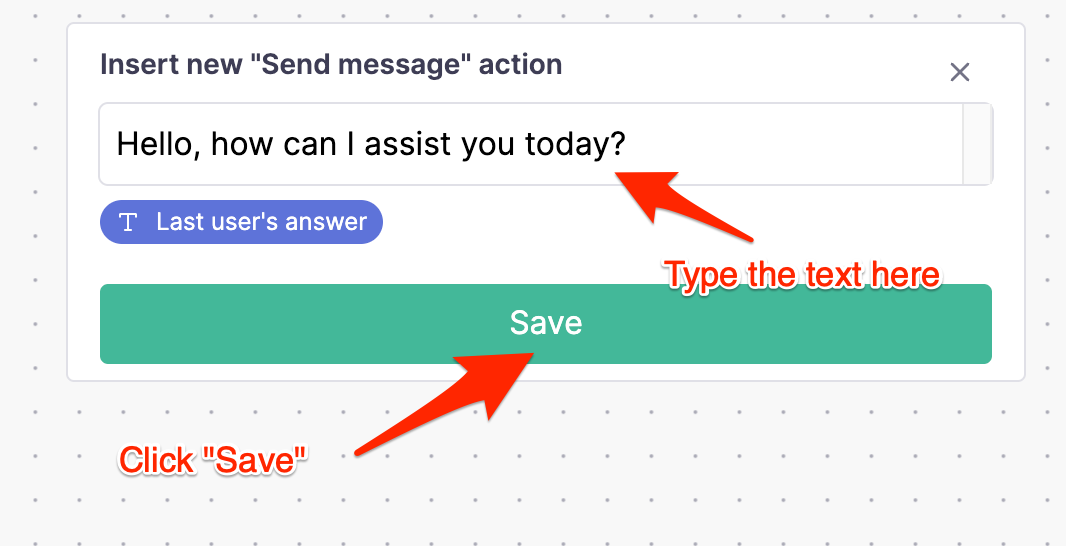
- A panel opens to configure the action. In this case, simply add a text message:
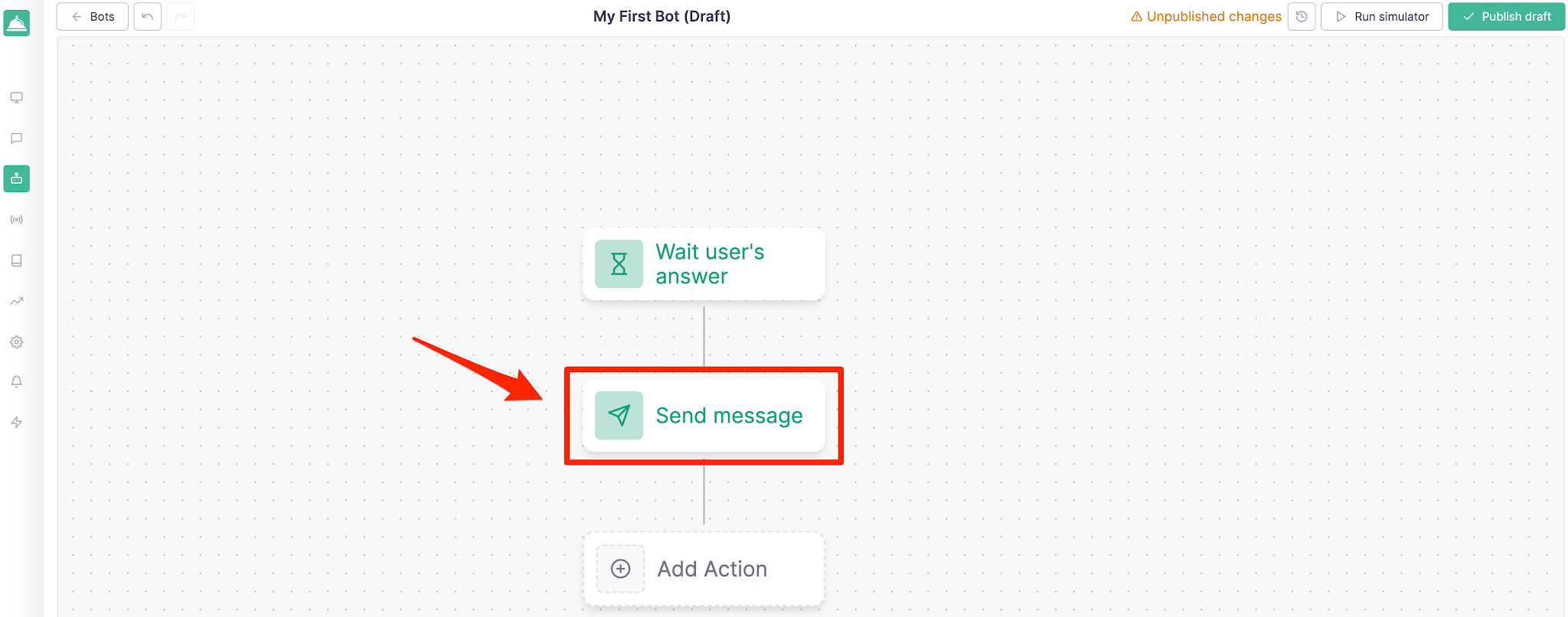
After clicking the Save button, you’ll be redirected to the bot builder page where you can see the action you just created:
Test the bot
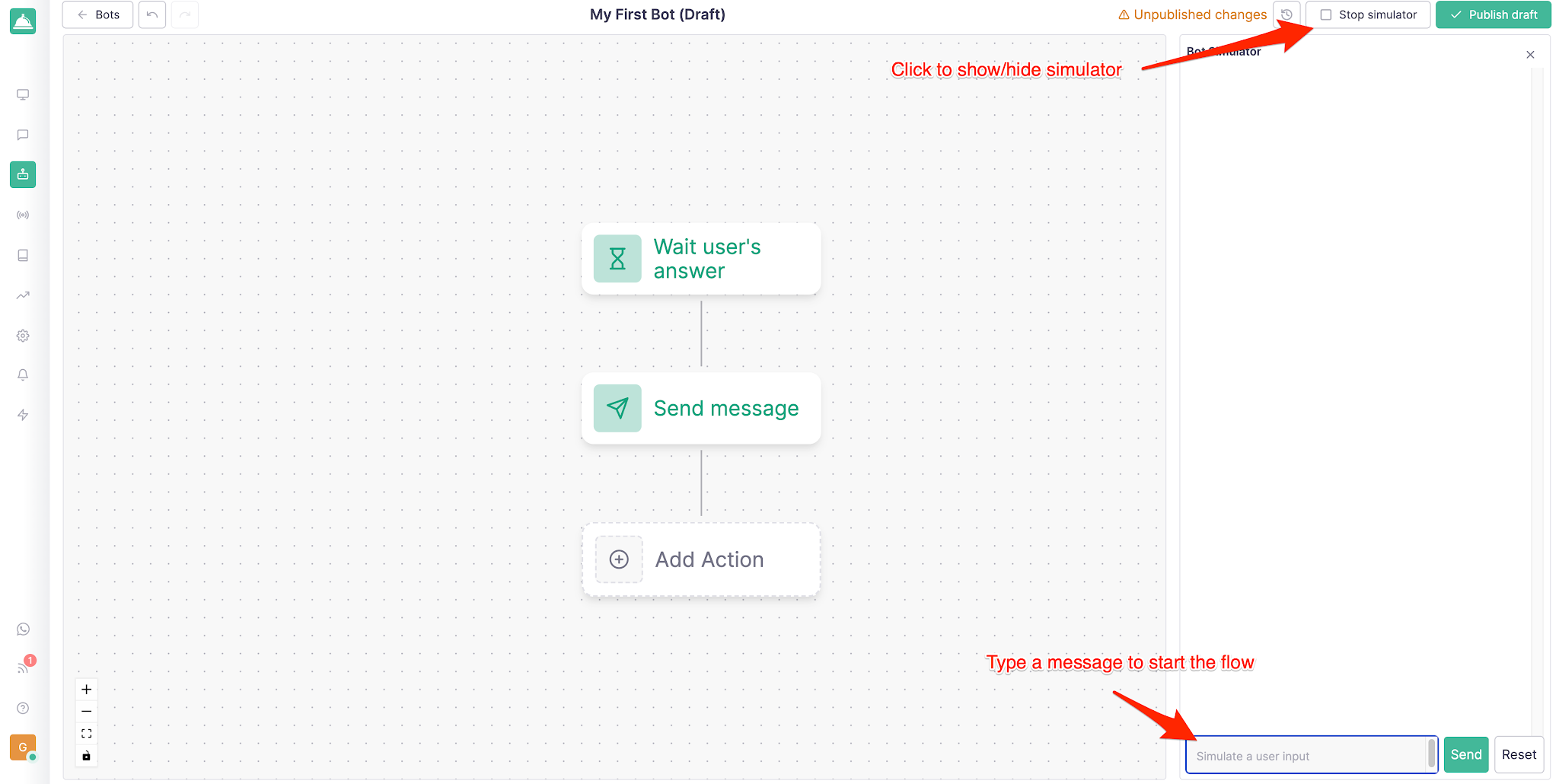
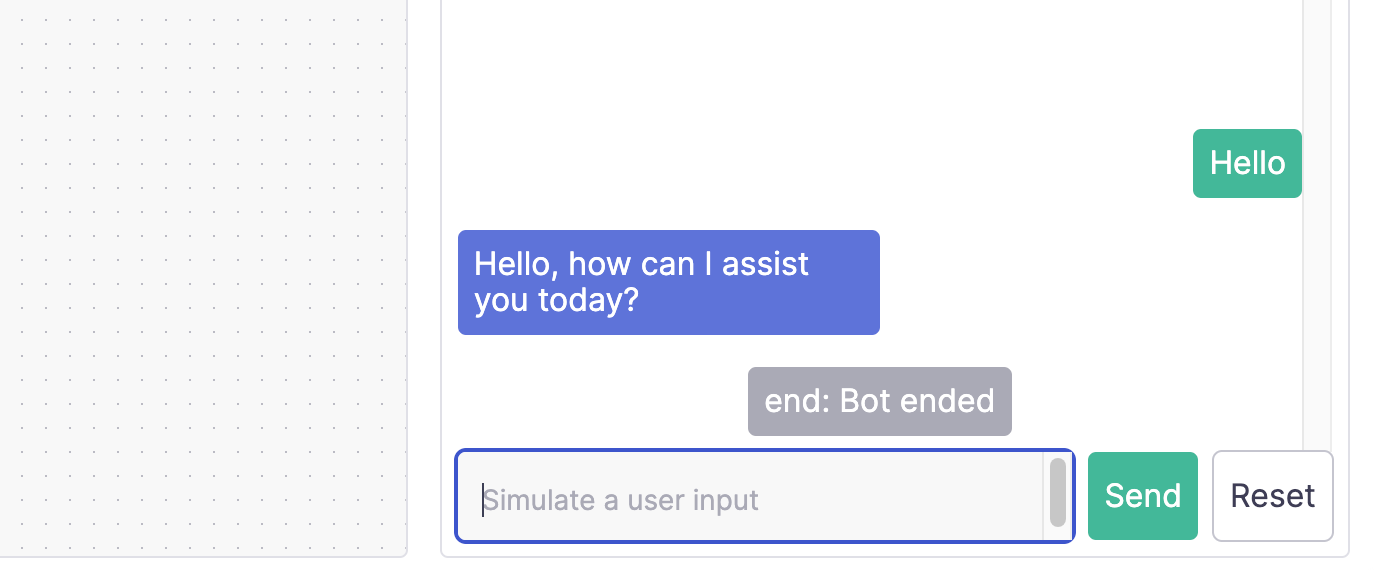
To test the bot, click the Run simulator button located in the top right corner. This will open a panel where you can test the new flow:
- Click the Send button to see how the bot responds with the message you just set up
Publish the bot
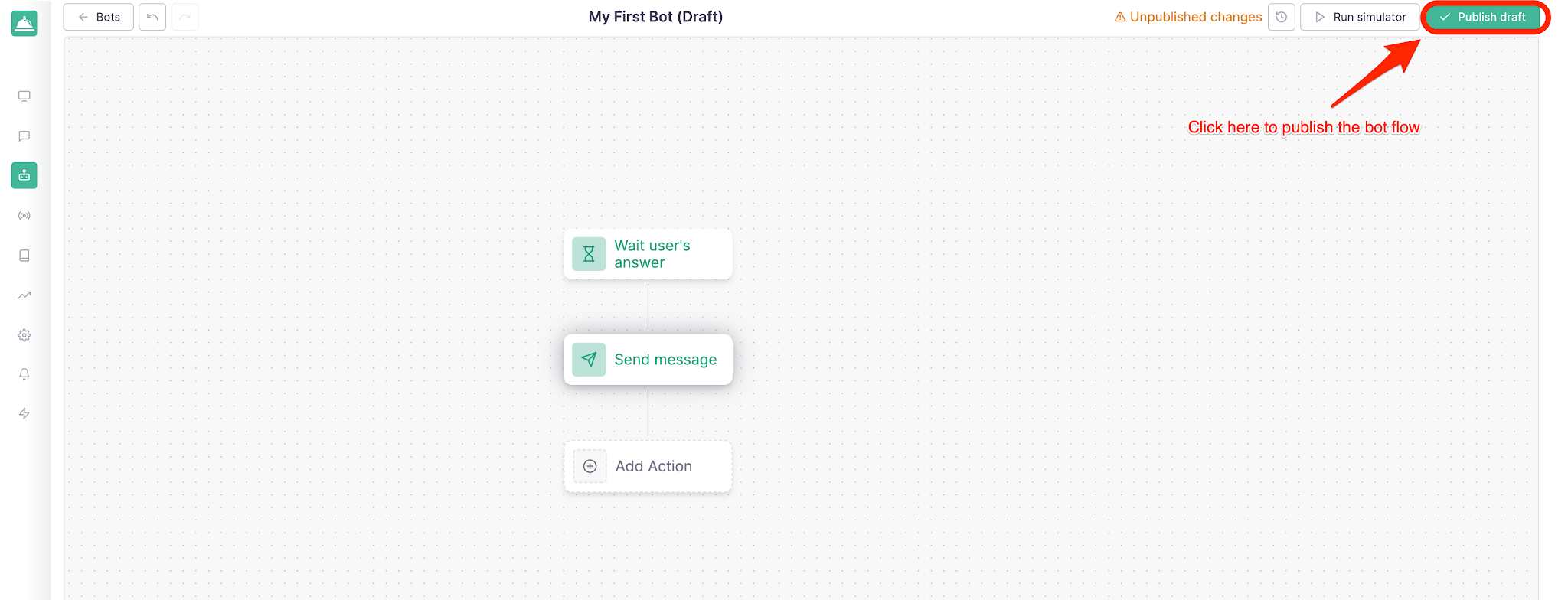
Once the bot is approved, you can publish it by clicking the Publish draft button in the top right corner of the page:
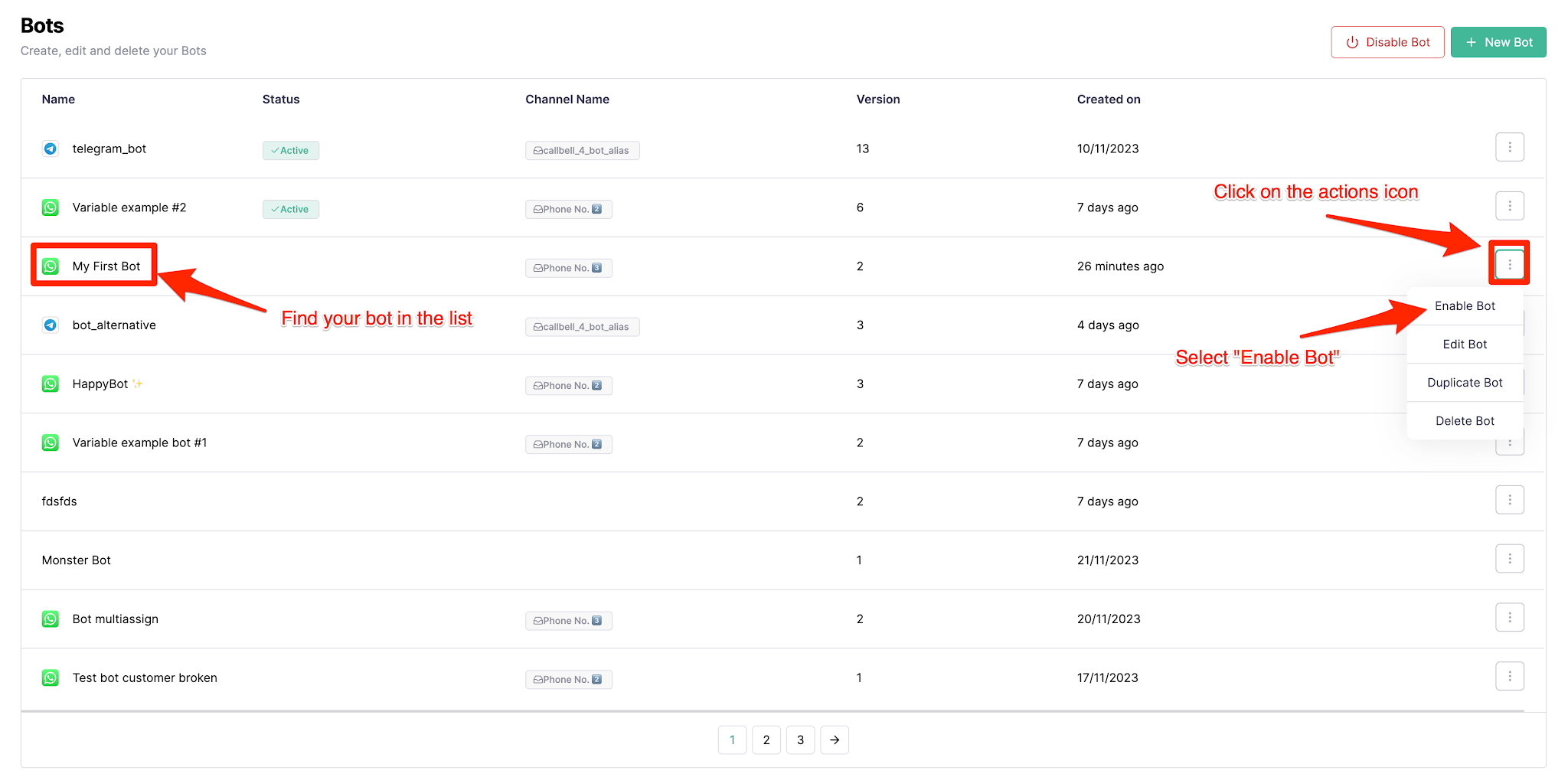
After clicking the “Publish draft” button and confirming, the flow is published and you must activate the bot so it’s available to customers. You can do this by going back to the "Bots" section in the right sidebar and clicking the “Activate bot” button:
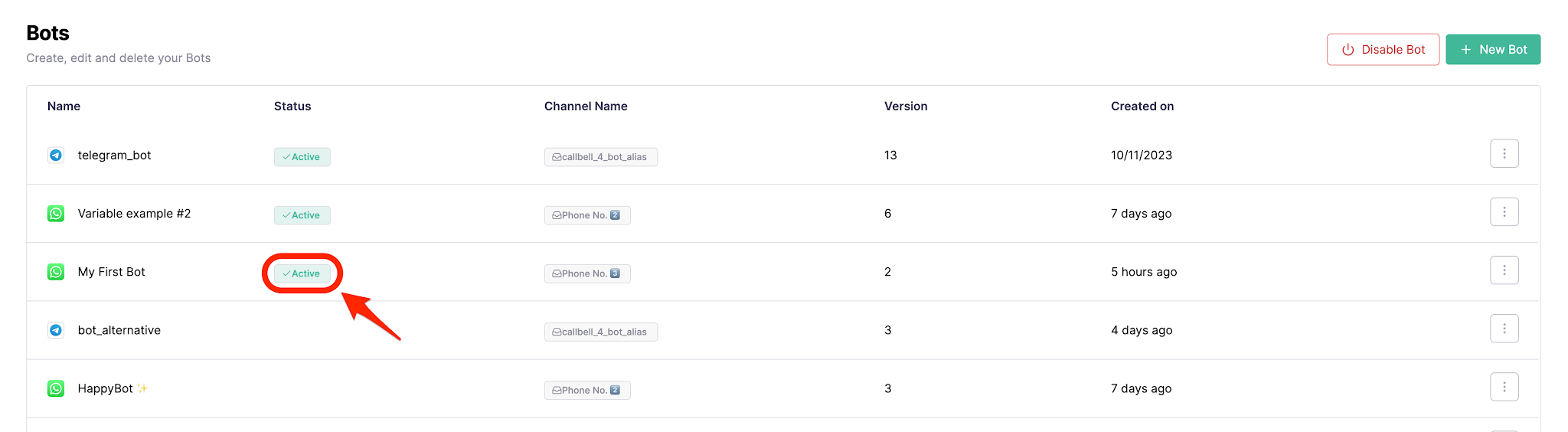
To confirm that the bot is activated, check its status in the "Bots" section:
Powerful actions you can achieve with a WhatsApp chatbot from Callbell
When the messaging channel is connected to a professional tool like Meta’s Official API and managed by Callbell, WhatsApp stops being just a traditional channel and becomes an advanced transactional method. These are the standout actions that transform operations:
1. Mass campaigns and Meta-approved templates
Manual mass sending can put your business line at risk if there’s no direct connection with Meta. With Callbell, you can send mass broadcasts using pre-approved message templates from Meta. This allows you to send service updates or marketing promotions to hundreds of customers simultaneously with zero risk of being banned, ensuring your brand has smooth and professional communication.
2. Interactive messages (Quick action buttons and list menus)
- Quick reply buttons: You can add up to 3 buttons to the template. Example: [Buy now], [Book appointment], [Support]). This way, the user can choose an option and the bot manages the next step.
- List menus: These work as a dropdown list with up to 10 options, which can be organized by category. Example: types of certificates, credits, products of interest, among others. This speeds up interaction, reduces typing errors, and optimizes navigation within the bot.
3. Conversational remarketing strategies
One of the most valuable processes is reconnecting with customers who abandoned a purchase or have bought before. Through the database, automatic tags can be assigned to chats depending on their interest and decision. The system allows you to schedule automated remarketing flows targeted exclusively at these tags to rekindle commercial interest with personalized offers.
4. Integration with CRMs and management systems
Through API and Webhooks connections, the bot integrates with business systems and CRMs like HubSpot, Google Calendar, and more. This makes it easy for the chatbot to collect all customer information and automatically sync the data with the company’s CRM, eliminating operational errors or forgotten important tasks.
5. WhatsApp Flows and transactional process integration
With Callbell, you can design complete experiences without the user leaving WhatsApp. With advanced integrations, the chatbot can guide the customer through dynamic flows such as: selecting appointments, capturing billing data, and even providing secure payment links connected to digital gateways, ensuring speed and above all, transaction security.
How does a WhatsApp chatbot change your business’s daily routine?
Business process | Without chatbot | With chatbot and Callbell |
After-hours support | The customer writes at night and receives a response the next day. | The bot provides answers, implements interactive menus, collects data, and leaves the qualified lead for the team. |
Advertising campaigns | Traffic from ads overwhelms agents, causing delays and lost opportunities. | The bot processes thousands of chats in seconds using quick reply buttons. |
Database management | An agent who has chats on their personal phone and leaves takes the customers with them. | Everything is centralized in the inbox. Remarketing conversations are tagged and synced with the company CRM. |
Sending notifications | Manual mass messages cannot be sent due to risk of being banned. | Mass and secure sends with Meta-approved templates to reactivate customers. |
Conclusion:
Implementing a WhatsApp chatbot through unofficial IT tools exposes the company to serious consequences, such as disorganized support, loss of customer information, and permanent suspensions by Meta that directly affect business profits. For this reason, in a market where fast responses determine sales success, automation must be backed by a fully secure, professional system that allows you to review its performance at any time.
The Callbell platform stands out as the ultimate solution for companies that want to transform their communication. By connecting the Official WhatsApp Business API with an intuitive control panel, communication problems are eliminated, risks of number blocking are forgotten, and supervisors are given absolute control over conversations. A centralized operation where you can see what’s happening in real time guarantees a secure business and a real increase in sales.

About the author: Hello! I am Alan and I am the marketing manager at Callbell, the first communication platform designed to help sales and support teams to collaborate and communicate with customers through direct messaging applications such as WhatsApp, Messenger, Telegram and Instagram Direct